
Offset-based pagination vs Cursor-based pagination

1. Offset-based pagination
How it works
You request data using a page number or offset and limit.
SELECT *
FROM orders
ORDER BY created_at DESC
LIMIT 20 OFFSET 40;  -- page 3 (20 items per page)
API example
GET /orders?page=3&pageSize=20
✅ Pros
Very simple to understand and implement
Easy to jump to any page (page 1, page 10, etc.)
Works well for small or static datasets
❌ Cons
Poor performance on large datasets (DB must scan and skip rows)
Inconsistent results if data changes:
Inserts/deletes can cause duplicates or missing records between pages
Not ideal for real-time or frequently updated data
📌 Best use cases
Admin dashboards
Reports with relatively static data
Small tables
2. Cursor-based pagination
How it works
Instead of offsets, you pass a cursor (a unique, ordered value from the last item of the previous page).
SELECT *
FROM orders
WHERE created_at < '2025-12-18T10:15:00Z'
ORDER BY created_at DESC
LIMIT 20;
API example
GET /orders?limit=20&cursor=2025-12-18T10:15:00Z
The cursor usually represents:
A timestamp (
created_at)An ID
Or a composite key (e.g.,
(created_at, id))
✅ Pros
Consistent pagination even when data changes
Much better performance for large datasets
Scales well for high-traffic APIs
Ideal for infinite scroll / feeds
❌ Cons
Slightly more complex to implement
Cannot easily jump to an arbitrary page number
Requires a stable, indexed ordering column
📌 Best use cases
User feeds (orders, events, logs)
Infinite scroll UIs
High-volume, frequently updated tables
3. Side-by-side comparison
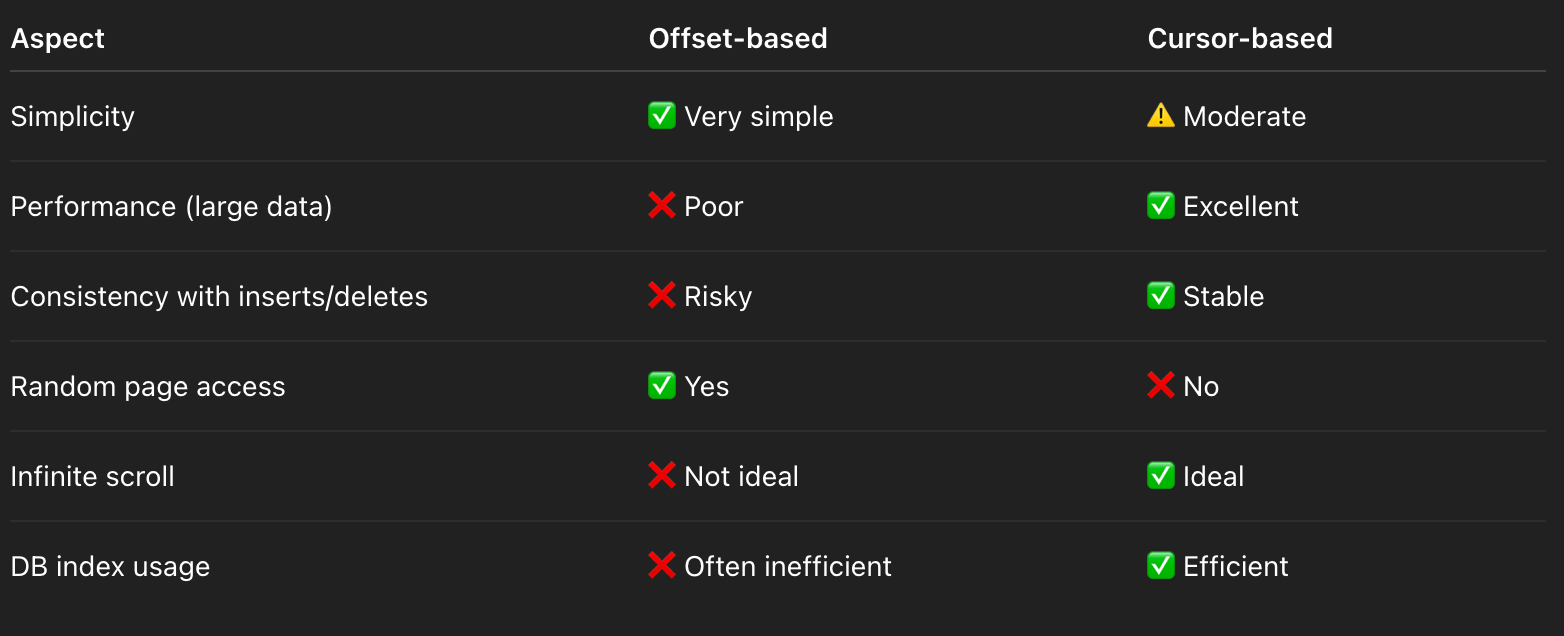
4. Which should you choose?
Choose offset-based when:
Dataset is small
Data doesn’t change frequently
You need page numbers
Choose cursor-based when:
Dataset is large
Data is frequently inserted/updated
You care about performance and correctness
You’re building feeds or scroll-based UIs
5. Real-world rule of thumb
If your table can grow large or receives frequent writes → use cursor-based pagination.
If it’s mostly static and small → offset-based is fine.